You built an AI memory system. Now your agent needs hands. Here are 6 extensions that compound — from household…
Original article: Read on Nate’s Substack
Processed: March 14, 2026
Summary
Main Thesis
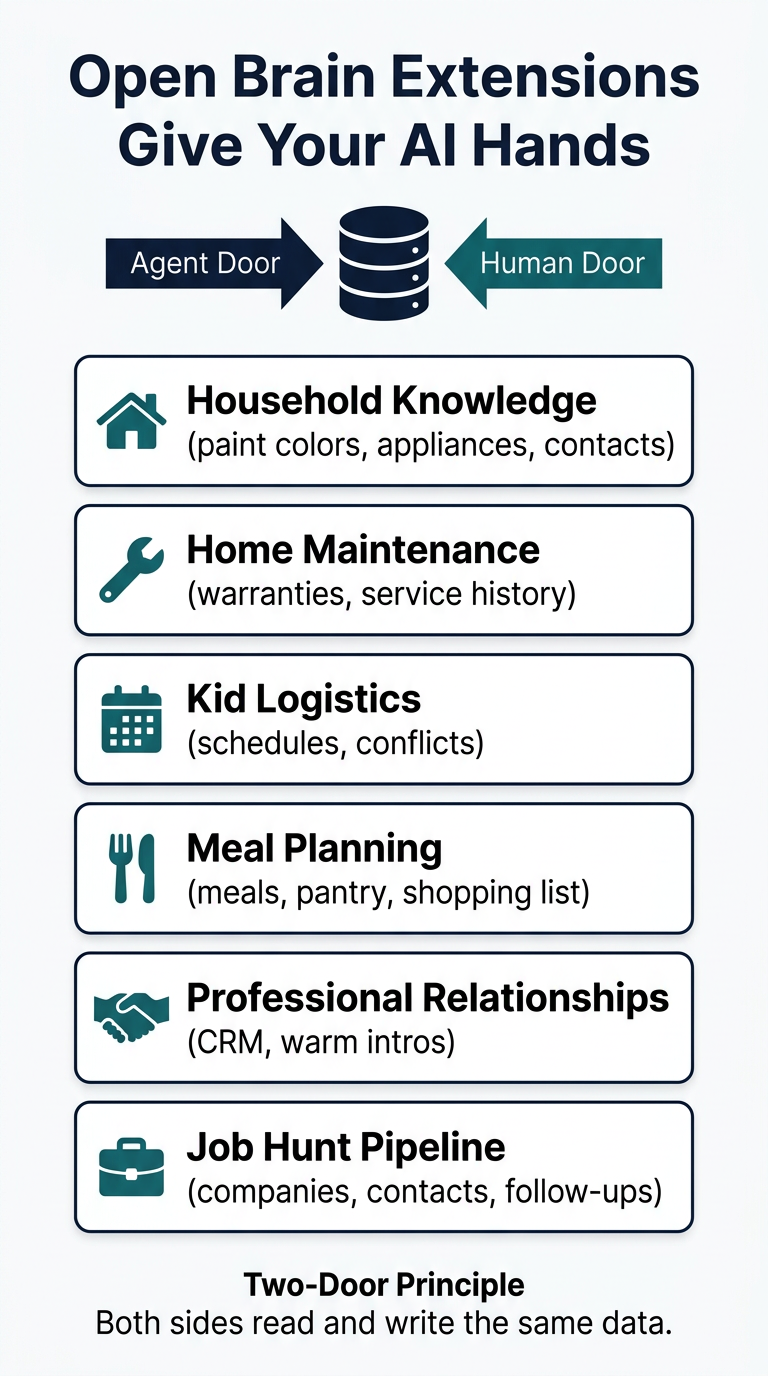
Having a personal AI memory system (Open Brain — a database you own, connected to AI via MCP) is just infrastructure. The real value comes from building extensions on top of it: structured shared surfaces where both you and your AI agent can read and write the same data. Nate calls this the two-door principle — every extension needs an agent door and a human door, each doing what it does best.
Key Data Points & Findings
- OpenClaw became the fastest-growing open-source project in GitHub history — over 250,000 stars in two months, surpassing React’s decade-long record
- Moltbook claimed 1.5 million agents within weeks of launch before Meta acquired it
- Devin grew from $1M to $73M ARR in nine months; Sierra hit a $10B valuation
- All these agents share the same core problem: they can’t remember you across sessions
- Open Brain solves this with a personal database (Supabase) connected via MCP — costs ~$0.10/month, takes 45 minutes to set up
- Thousands of people built the original Open Brain system from Nate’s previous guide
The Six Extensions
-
Household Knowledge — One structured table for paint colors, appliance info, WiFi passwords, kids’ shoe sizes. Agent captures facts conversationally; you browse by category on your phone.
-
Home Maintenance — Assets, purchase dates, warranty expiration, service history. Agent bridges time: sees that a tech mentioned pump wear 18 months ago + warranty expires soon = proactive heads-up.
-
Kid Logistics — All kids’ events + both parents’ schedules in one place. Agent catches the conflicts a calendar never shows (two events same night, birthday party with no gift bought, haircut needed before picture day).
-
Meal Planning — Intersects meal history, pantry, weekly schedule, and shopping list simultaneously. Agent generates the plan and list proactively; you check off items on your phone while shopping.
-
Professional Relationships (CRM) — Agent flags warming relationships going cold, surfaces context before you reach out. You make the judgment call on what to say and when.
-
Job Hunt Pipeline — Full pipeline visibility (applications, contacts, interviews, follow-ups). Agent catches warm intros going cold, spots patterns (“you’re 5/5 in your core domain — the 2 rejections were both industries with no background”), corrects the emotional distortions that job hunting produces.
The Four Core Principles
-
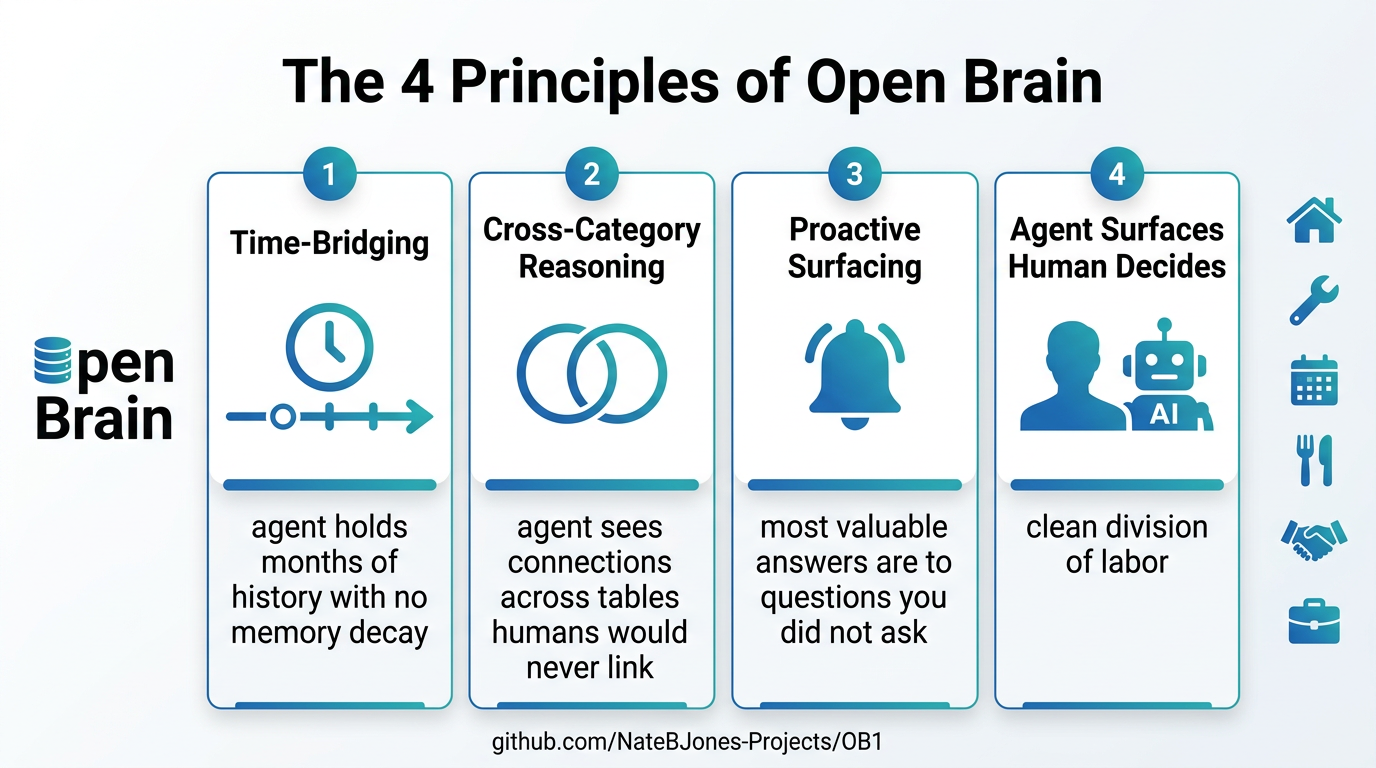
Agent bridges time — Its memory doesn’t decay. Anywhere value comes from linking events spread across months or years, that’s your agent’s territory.
-
Agent sees across categories — The power isn’t in any single table; it’s in connections between tables no human would cross-reference manually.
-
Most valuable answers are to questions you didn’t ask — A database waits for queries. An agent notices things proactively. Design tables for what you want your agent to notice, not just what you want to look up.
-
Agent surfaces, human decides, agent executes — The division is clean and non-negotiable. Blur it and you stop trusting the system. Hold it and you get consistently sharper.
Pull vs Push Architecture
Conversational clients (Claude, ChatGPT) handle the pull — you ask a broad question and the agent reasons across your data in the moment. Autonomous agents (like OpenClaw) handle the push — they scan data on a schedule and surface what’s urgent before you think to ask. Same database, different interfaces, each doing what it’s best at.
Why This Architecture Matters Long-Term
When data lives in your own database, your agent has first-class access — no platform API limitations, no permission from a third party. And every time the underlying models improve, every extension you’ve built becomes more valuable automatically because the data is structured for reasoning, not just storage.
Practical Takeaways
- Start with the extension that hit you hardest from the article
- Build the table first; the visual front-end layer comes later
- Design every extension for all four modes: agent reads, agent writes, human reads, human writes
- Use conversational clients for pull (ask broad questions), autonomous agents for push (schedule-based monitoring)
- The judgment line is sacred: agent surfaces, you decide
Prompt Kit
From Nate’s companion prompts — included in full below.
Open Brain Extensions: Companion Prompts
Your Open Brain is running. Your agent reads from it, writes to it, remembers what you said last Tuesday. Now it’s time to give it hands. These six prompts cover the full arc: figure out which extensions match your life, learn to navigate the OB1 repo where everything lives, populate your first tables with real data, audit whether your setup has both doors open, design your own extensions using the four principles from the article, and — if you build something worth sharing — package it as a contribution to the community.
Everything lives here: OB1 on GitHub
Note: If you’re brand new to Open Brain, start with the original companion prompts first — they cover initial setup, memory migration, and building the capture habit. This kit assumes your Open Brain is already running and you’re ready to extend it.
Prompt 0: Star OB1 on GitHub
Job: Your first GitHub skill. Takes 10 seconds. Makes OB1 easier for other people to find — and bookmarks it for you.
When to use: Right now. Before you do anything else.
- Open github.com/NateBJones-Projects/OB1
- If you don’t have a GitHub account, create one (free, takes 30 seconds)
- Click the ☆ Star button in the top right corner
Prompt 1: Extension Matchmaker
Job: Interviews you about your life situation and generates a personalized build order from the six OB1 extensions, pointing you to the exact GitHub page for each recommendation.
When to use: Right after reading the article, when you’re staring at six use cases and not sure which one to start with.
What the AI will ask you:
- Your living situation (homeowner/renter, kids, partner)
- Your professional situation (employed, job hunting, freelance, managing relationships)
- What annoys you most about managing your life right now
- Which use cases from the article hit hardest
Prompt 2: GitHub Navigator
Job: Teaches you how to read, navigate, and use the OB1 repository on GitHub — even if you’ve never used GitHub before.
Repo structure:
OB1/
├── README.md          ← Start here
├── CONTRIBUTING.md    ← Contribution rules
├── extensions/        ← The six extension build guides
│   ├── household-knowledge/
│   ├── home-maintenance/
│   ├── family-calendar/
│   ├── meal-planning/
│   ├── professional-crm/
│   └── job-hunt-pipeline/
├── primitives/        ← Shared building blocks
├── setup/             ← Initial setup
├── companion-prompts/ ← AI prompts
├── recipes/           ← Community contributions
├── schemas/           ← Community schemas
├── dashboards/        ← Community dashboards
└── integrations/      ← Community integrations
Prompt 3: Extension Launcher
Job: Walks you through populating your first extension table with real data from your actual life.
When to use: After you’ve created the table and you’re staring at an empty schema.
What the AI will ask:
- Which extension you’re populating
- Confirmation that the table exists in your Open Brain
- A structured interview specific to that extension
Prompt 4: Two-Door Audit
Job: Evaluates your current Open Brain setup against the two-door principle and identifies where you’re only using half the system.
What you’ll get: A diagnostic of which of the four modes you’re actually using (agent reads, agent writes, human reads, human writes) with specific recommendations for closing the gaps.
Prompt 5: Design Your Own Extension
Job: Helps you architect a custom Open Brain extension for a problem the six built-in ones don’t cover, using the four principles: time-bridging, cross-category reasoning, proactive surfacing, and the judgment line.
What you’ll get: A complete extension design — table schema, data capture plan, example queries, and a clear judgment line.
Prompt 6: OB1 Contribution Builder
Job: Helps you turn something you built on your Open Brain into a properly structured community contribution to the OB1 repo.
Automated review rules the contribution must pass:
- README.md exists and is non-empty
- README follows the standard template structure
- SQL files use standard PostgreSQL syntax
- No hardcoded personal data (API keys, names, emails)
- File names use lowercase-with-hyphens convention
- Folder is in the correct contribution category directory
- No duplicate of existing contribution
- All referenced files exist in the folder
- Code blocks are properly formatted
- Prerequisites section lists dependencies
- Difficulty level is specified
Infographics