Claude won 4 of 8 blind writing tests, leads reasoning by 14.6 points, and follows instructions 94% of the time —…
Claude won 4 of 8 blind writing tests, leads reasoning by 14.6 points, and follows instructions 94% of the time — here’s why none of that helps if you prompt it like ChatGPT
Original article: https://natesnewsletter.substack.com/p/millions-just-switched-to-claude
Author: Nate Jones | Published: March 5, 2026
Source: Nate’s Substack
Summary
Millions just downloaded Claude because Anthropic told the Pentagon no and the public responded by making it the #1 app in America. The problem: almost all of them are treating Claude as a drop-in replacement for ChatGPT. Same prompts, same habits — and that’s not how AI works. This article is the translator.
Claude and ChatGPT were built with fundamentally different training approaches (Constitutional AI vs RLHF), and those differences produce measurably different behaviour. Using Claude well requires understanding what those differences are and how to activate them.
The 7 Tenets for ChatGPT Switchers
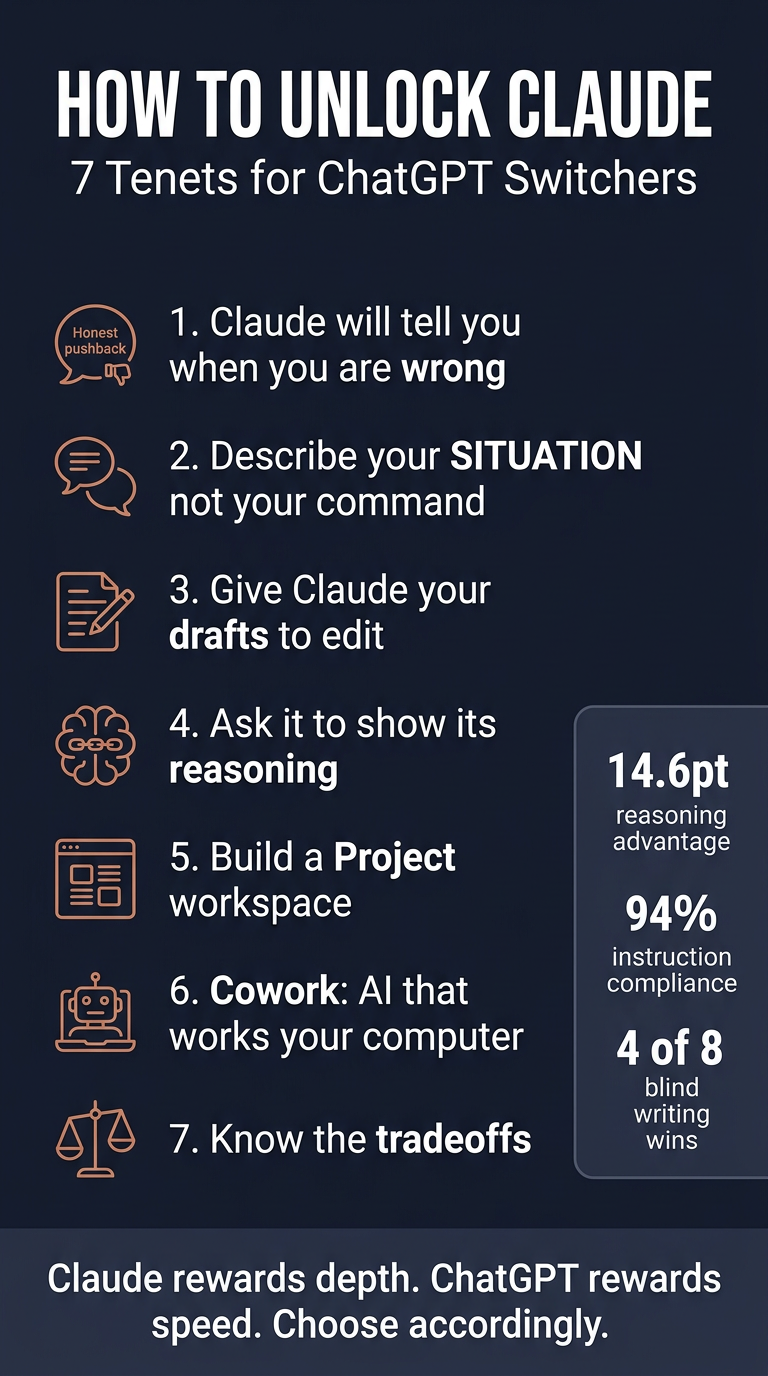
1. Claude is more likely to tell you your plan has a hole in it
Claude’s Constitutional AI training explicitly optimises for honesty. It’s more likely to flag a concern, question your framing, or tell you something you didn’t ask to hear. ChatGPT had a documented sycophancy problem (an April 2025 update was so bad OpenAI rolled it back in 4 days). The current models are better, but the architectural difference remains. This matters most for expensive decisions — plans that should never have been executed.
2. Describe your situation, not your desired output
Claude responds to situations noticeably better than commands. Instead of “write talking points for a budget meeting,” try “I’m presenting Q2 budget to my CFO next Tuesday. We overspent on contractors by 18%…” Give Claude your political landscape and it will help you think strategically, not just produce formatted output.
3. Give Claude your work, not a blank canvas
Claude is consistently better at editing existing work than generating from nothing. In a blind test with 100+ voters across 8 prompts, Claude won 4 rounds while ChatGPT won 1. Claude preserves your voice while sharpening arguments; ChatGPT tends to rewrite in a generic AI register. The “worst email in your drafts folder” demo converts sceptics every time.
4. Ask Claude to show its reasoning
Claude’s extended thinking can interleave reasoning with tool use — think, check something, think more, adjust. On ARC-AGI-2 (novel pattern recognition, not memorised knowledge), Claude Opus 4.6 scores 68.8% vs GPT-5.2’s 54.2% — a 14.6-point gap. Use extended thinking for genuinely hard problems: contract analysis, strategic tradeoffs, debugging. Read the reasoning chain to catch mistakes before they become yours.
5. Build a workspace, not a chatbox
Claude follows complex system-level instructions more consistently without drifting — 94% exact compliance vs ChatGPT’s 87% (500-task PxlPeak study). Set up a Claude Project with specific operating rules (not vague “help me with marketing” — specific role, audience, constraints, boss preferences). Every conversation inherits that context.
6. Claude can work on your computer
Cowork (Claude Max, $100–200/month) is a desktop agent for macOS/Windows with no ChatGPT equivalent. It opens files, reads them, edits them, organises them, and executes multi-step tasks autonomously. Bloomberg reported Cowork’s launch triggered a $285 billion selloff in enterprise software stocks.
7. Know what you’re giving up
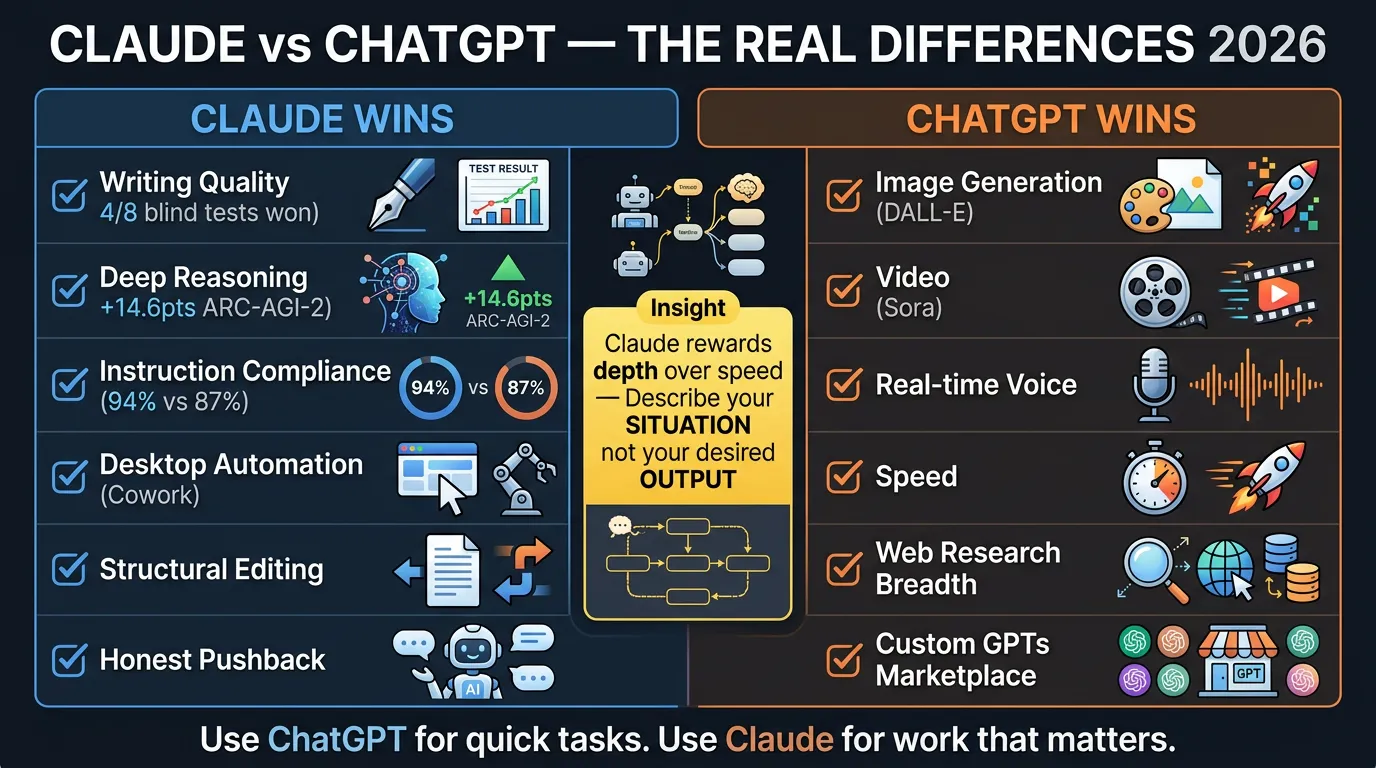
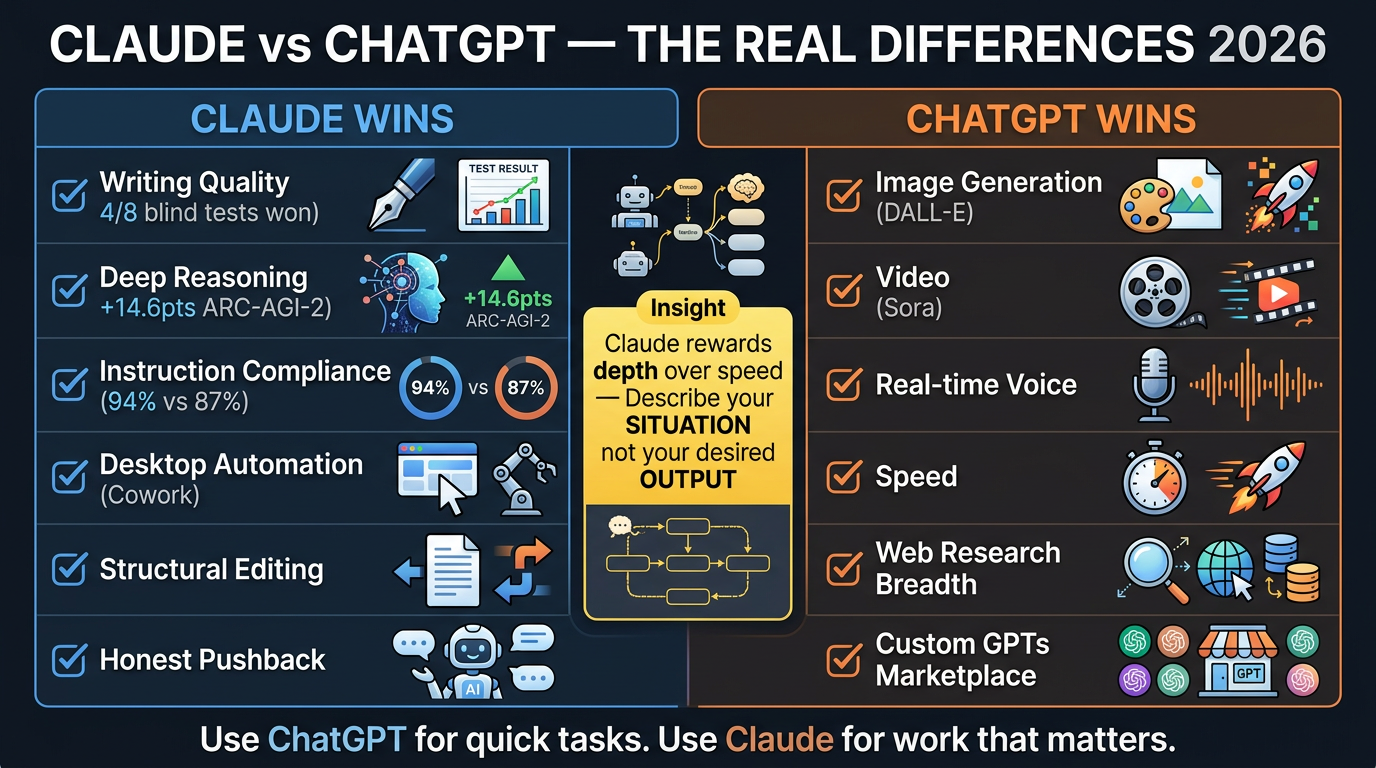
Claude is better at: writing quality, deep reasoning, instruction compliance, coding (slim SWE-bench lead), desktop automation.
ChatGPT is better at: image generation (DALL-E), video (Sora), real-time voice, speed, web research breadth, Custom GPTs marketplace, global persistent memory.
The smartest users don’t pick one. ChatGPT for rapid ideation and image work; Claude for anything that needs to be right rather than fast.
The Benchmark Evidence
| Metric | Claude | ChatGPT |
|---|---|---|
| ARC-AGI-2 reasoning | 68.8% (Opus 4.6) | 54.2% (GPT-5.2) |
| Instruction compliance | 94% | 87% |
| Blind writing wins | 4 of 8 | 1 of 8 |
| Context window | 200K (stable) | 128K (drops accuracy >60%) |
Key Practical Insight
Most new Claude users will poke at it for 3 days with ChatGPT habits and go back. The gap between “downloaded it” and “transformed by it” is a 5-minute conversation where someone who gets it shows someone who doesn’t. Claude rewards depth over speed, honesty over validation, collaboration over commands.
Infographics
Portrait (9:16)
Landscape (16:9)
Processed by Angus on 2026-03-08. Part of the Nate’s Substack monitor workflow.
Prompt Kit
Source: https://promptkit.natebjones.com/20260302_t1f_promptkit_1
Prompt Kit: Getting the Most Out of Claude (Not Just Using It Like ChatGPT)
Millions of people just downloaded Claude and are using it with the same habits they built in ChatGPT — getting underwhelming results and wondering what the fuss is about. This kit gives you prompts that activate what Claude actually does differently: honest pushback, situation-aware reasoning, structural editing, visible thinking, and persistent workspaces.
How to use this kit
-
Start with Prompt 1 (Plan Stress-Tester) or Prompt 3 (Structural Editor) — these show the difference fastest.
-
To help someone else: Send them Prompt 3 with “paste the worst email in your drafts folder.” That single experience converts more people than any explanation.
-
Quick Versions: 2–4 sentences you paste before your actual request. Full Versions: structured prompts that gather context conversationally.
Prompt 1: The Plan Stress-Tester
Job: Takes any plan, idea, or strategy and identifies the holes before someone important does.
When to use: Before presenting to leadership, committing budget, launching a project, or any decision where an unchallenged bad assumption could be expensive.
What you’ll get: A ranked list of vulnerabilities — weakest assumptions, unexamined risks, likely failure modes — followed by specific suggestions to address each.
What Claude will ask: Your plan or idea, who it needs to convince, what’s at stake, and your constraints.
Prompt 2: The Situation Briefer
Job: Transforms how you interact with Claude by training it to pull rich situational context before producing anything — so your first output is strategic, not generic.
When to use: Whenever you catch yourself about to type “write me a…” or “give me five ideas for…” — this teaches Claude to interview you first.
What you’ll get: A structured back-and-forth where Claude maps your situation, then produces output shaped by your specific context, audience, constraints, and stakes.
Prompt 3: The Structural Editor
Job: Takes something you’ve written and provides deep structural feedback — not grammar fixes, but weak arguments, buried insights, logical contradictions, and voice inconsistencies.
When to use: Any draft that needs to persuade — email, proposal, strategy doc, blog post, presentation script.
What you’ll get: Structural assessment identifying the weakest points, what to move, cut, and add — while preserving your voice.
Prompt 4: The Complex Problem Reasoner
Job: Works through a genuinely hard problem step by step, showing the full reasoning chain so you can participate in the analysis, not just receive a verdict.
When to use: Comparing vendor proposals, evaluating contracts, reconciling conflicting data, modeling strategic tradeoffs. Enable extended thinking for best results.
What you’ll get: Transparent reasoning that flags uncertainty and arrives at a recommendation you can evaluate because you can see how it got there.
Prompt 5: The Project Setup Generator
Job: Interviews you about your work and produces ready-to-paste custom instructions for a Claude Project — turning Claude from a generic assistant into something that feels embedded in your team.
When to use: Setting up a new Claude Project for a recurring domain. Invest 5 minutes and every future conversation in that Project inherits the context automatically.
Prompt 6: The Right Tool Advisor
Job: Honest assessment of whether Claude or ChatGPT is the better fit for a specific task — based on actual capability differences, not brand loyalty.
When to use: When you’re about to start a task and want to use the right tool instead of defaulting to whatever’s already open.
Infographics